



Tax season turns accounting firms into bottleneck factories. New client onboarding takes 45-60 minutes per engagement. CPAs spend half their time chasing missing documents instead of doing billable work. The average accounting firm loses 15-20% of potential clients during onboarding because the process is too slow and cumbersome.
AI-powered intake forms built with Dashform automate the entire client onboarding process for accounting firms. New clients answer intelligent questionnaires that adapt to their business type, tax situation, and service needs. Documents are requested automatically. CPAs receive pre-organized client profiles before the first meeting.
Accounting Firm Client Onboarding: Manual vs AI-Automated
| Metric | Manual Process | AI-Automated | Improvement |
|---|---|---|---|
| Client onboarding time | 45-60 min | 12-15 min | -75% |
| Document collection rate | 62% | 94% | +52% |
| Tax season client capacity | 85 clients/CPA | 130 clients/CPA | +53% |
| Client drop-off during onboarding | 18% | 4% | -78% |
| Time to first billable work | 5-7 days | 1-2 days | -71% |
| Client satisfaction (onboarding) | 3.4/5 | 4.8/5 | +41% |
The Onboarding Problem in Accounting
Most accounting firms onboard new clients through a combination of phone calls, email chains, and paper forms. The process typically looks like this:
- Initial phone call (15-20 minutes) to understand the client's business type, tax situation, and service needs.
- Email a PDF intake questionnaire that asks for entity type, revenue range, number of employees, prior year tax return information, and accounting software used.
- Wait 3-7 days for the client to return the completed questionnaire with all supporting documents.
- Follow up 2-3 times for missing documents. W-2s, 1099s, prior returns, and bank statements are commonly forgotten.
- Manual data entry into practice management software (Canopy, TaxDome, Karbon, or CCH Axcess).
- Schedule the first working session once all information is collected.
According to The Journal of Accountancy , 67% of accounting firms cite client onboarding as their biggest operational bottleneck during tax season. The problem compounds: every hour spent on onboarding is an hour not spent on billable client work.
How AI Intake Forms Transform Accounting Client Onboarding
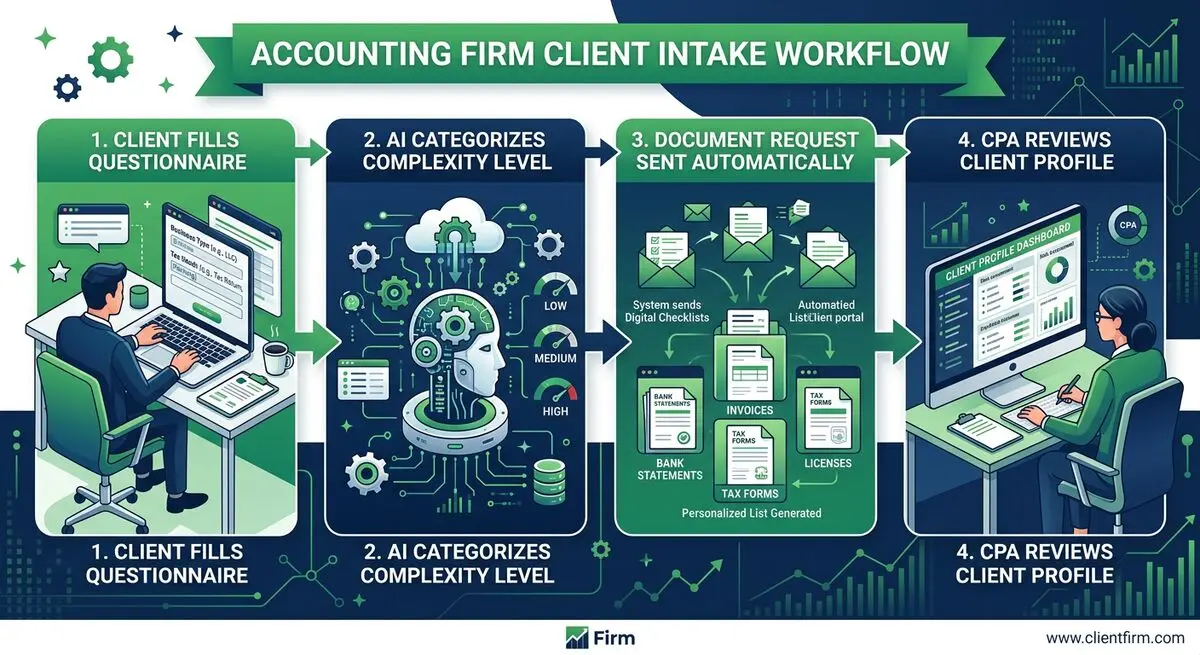
The Dashform AI Consultation Form Tool creates intelligent intake questionnaires that adapt based on client responses. This is not a static PDF sent via email. It is a dynamic form that asks the right questions to the right clients.
Here is how it works:
- A new client receives a branded intake link via email or SMS immediately after signing the engagement letter.
- The form starts with business classification: Individual, Sole Proprietor, LLC, S-Corp, C-Corp, Partnership, Non-Profit, or Trust. Each selection triggers a completely different question path.
- An S-Corp owner sees questions about shareholder distributions, reasonable compensation, payroll provider, and multi-state filing. An individual taxpayer sees questions about W-2 employment, investment income, rental properties, and life events.
- Document requests are generated automatically based on answers. A client reporting rental income gets asked to upload Schedule E from last year, property tax statements, and mortgage interest statements. A client with no rental income never sees these requests.
- Completion tracking shows the CPA exactly which clients have finished onboarding and which have missing documents, with automated reminder sequences.
Setting Up AI Client Intake for Your Accounting Firm
Step 1: Create Your Client Intake Questionnaire
Use the AI Consultation Form Tool to build your intake form. Describe your firm's specialties (individual tax, business tax, bookkeeping, advisory, estate planning) and the AI generates a comprehensive questionnaire with conditional logic for each client type.
Step 2: Build Your Onboarding Flow
Create a client onboarding sequence with the AI Onboarding Form Tool . This flow includes welcome information, engagement letter acknowledgment, document upload checklists, and payment setup. Each step is automated and trackable.
Step 3: Automate Document Collection
Configure conditional document requests that trigger based on intake answers. Clients who report investment income get a request for brokerage statements. Business owners get a request for P&L statements and balance sheets. Everything is collected in one place before the CPA reviews.
Step 4: Connect to Your Practice Management Software
Dashform integrates with Canopy, TaxDome, Karbon, CCH Axcess, and other accounting platforms through webhooks and Zapier. Client data flows directly into your workflow without re-entry.
Tax Season Impact: Real Numbers from Accounting Firms
Accounting firms that implement AI-powered client intake see transformative results during tax season:
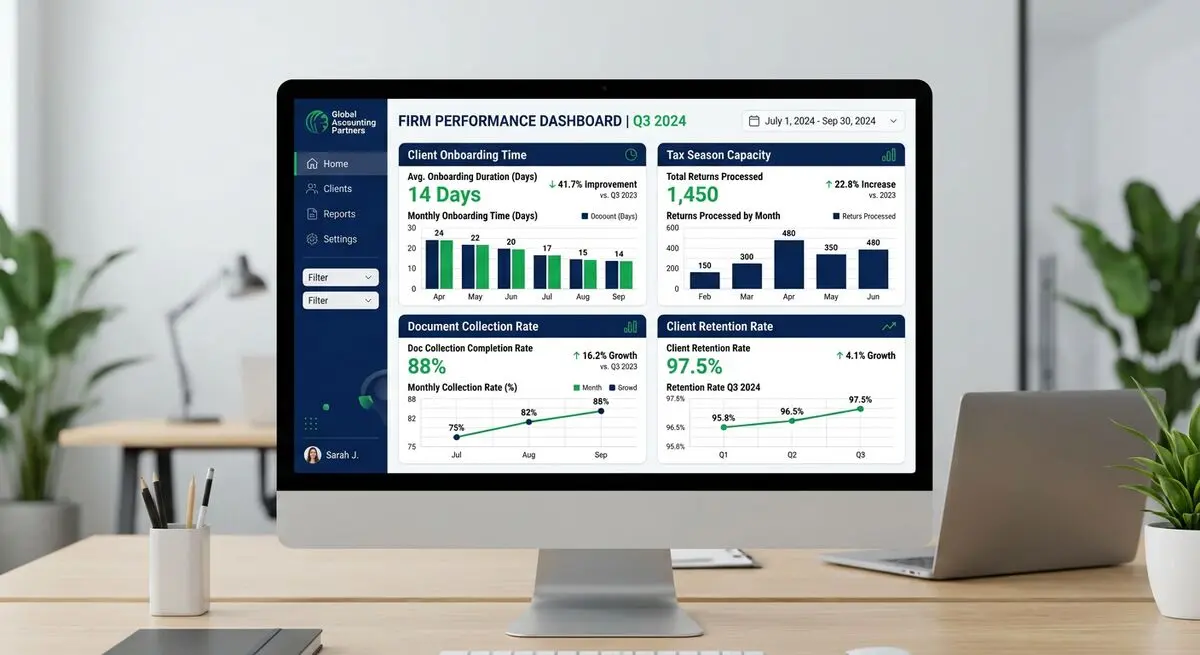
- Client onboarding time drops from 45-60 minutes to 12-15 minutes. CPAs receive pre-organized client profiles with all documents attached before the first interaction.
- Document collection rates jump from 62% to 94% on first request. Conditional logic ensures clients know exactly what documents they need, and automated reminders follow up on missing items.
- Tax season capacity increases 40-55% per CPA. When onboarding is automated, CPAs spend their time on billable work instead of chasing paperwork.
- Client drop-off during onboarding drops from 18% to under 4%. A smooth, professional digital intake experience sets the tone for the entire engagement.
The AICPA Practice Management Survey found that firms using automated intake processes grew revenue 23% faster than firms relying on manual onboarding. The correlation is clear: operational efficiency drives growth.
AI Intake Impact by Client Type
| Client Type | Onboarding Time Before | Onboarding Time After | Doc Collection Rate | Capacity Gain |
|---|---|---|---|---|
| Individual (W-2) | 30 min | 8 min | 96% | +65% |
| Sole Proprietor | 45 min | 12 min | 92% | +55% |
| S-Corp / LLC | 60 min | 18 min | 91% | +45% |
| C-Corp | 75 min | 22 min | 88% | +40% |
| Trust / Estate | 90 min | 25 min | 85% | +35% |
Beyond Tax Season: Year-Round AI Forms for Accounting
Tax season intake is the highest-impact use case, but Dashform supports your firm year-round:
- Client satisfaction surveys sent after engagement completion to measure NPS and collect testimonials for your website.
- Post-filing feedback forms to identify service improvements and upsell advisory services.
- Tax planning quizzes embedded on your website to attract new clients. 'How much could you save on taxes?' quizzes generate qualified leads year-round.
- Quarterly check-in forms for bookkeeping clients to collect updated financial information and flag potential issues before they become problems.
Frequently Asked Questions
How quickly can my firm implement AI intake forms?
Most accounting firms have their intake forms live within 2-3 hours. The AI generates the questionnaire based on your firm description and specialties. You customize the questions, add your branding, and send the first link to a new client the same day.
Will this work for both individual and business clients?
Yes. The conditional logic creates completely different question paths for each client type. An individual taxpayer with W-2 income answers 8-10 simple questions. An S-Corp owner with multiple entities answers a more detailed questionnaire. Each client only sees relevant questions.
Can clients upload documents through the form?
Yes. Dashform supports file uploads within the intake form. Clients can upload W-2s, 1099s, prior returns, bank statements, and any other documents directly. Files are organized by client and accessible from your dashboard.
How does this integrate with our existing tax software?
Dashform connects with Canopy, TaxDome, Karbon, CCH Axcess, Drake, and other platforms through webhooks and Zapier. Client data and documents flow directly into your existing workflow. Start your free trial.
What about data security for sensitive financial information?
Dashform uses encryption in transit and at rest for all form submissions. For firms handling sensitive financial data, review Dashform's security documentation to ensure compliance with your professional standards and client data protection requirements.





