

A buyer can ask an assistant to help prepare an inquiry about properties or an agent's services. If the assistant has a compatible connection to a published form, it can submit the buyer's answers for review.
This guide proposes an agent-assisted intake workflow. It contains no realtor interviews or measured sales results, and buyer-provided budget information is not financing verification.
The Problem: Unqualified Leads in Real Estate
Review which details your team needs before offering the next conversation: service area, property interests, stated budget, and timeline.
| Lead Source | Qualification Effort | Cost |
|---|---|---|
| Zillow/Realtor.com | Initial call | Paid per lead |
| Facebook Ads | Follow-up call | Ad spend |
| Open Houses | Conversation | Your time |
| Referrals | Short call | Commission split |
| AI Agent Funnel | Review submitted answers | Plan and external tool costs |
Do not assume conversion parity between channels. Track the information collected, staff review, and confirmed outcomes for each source.

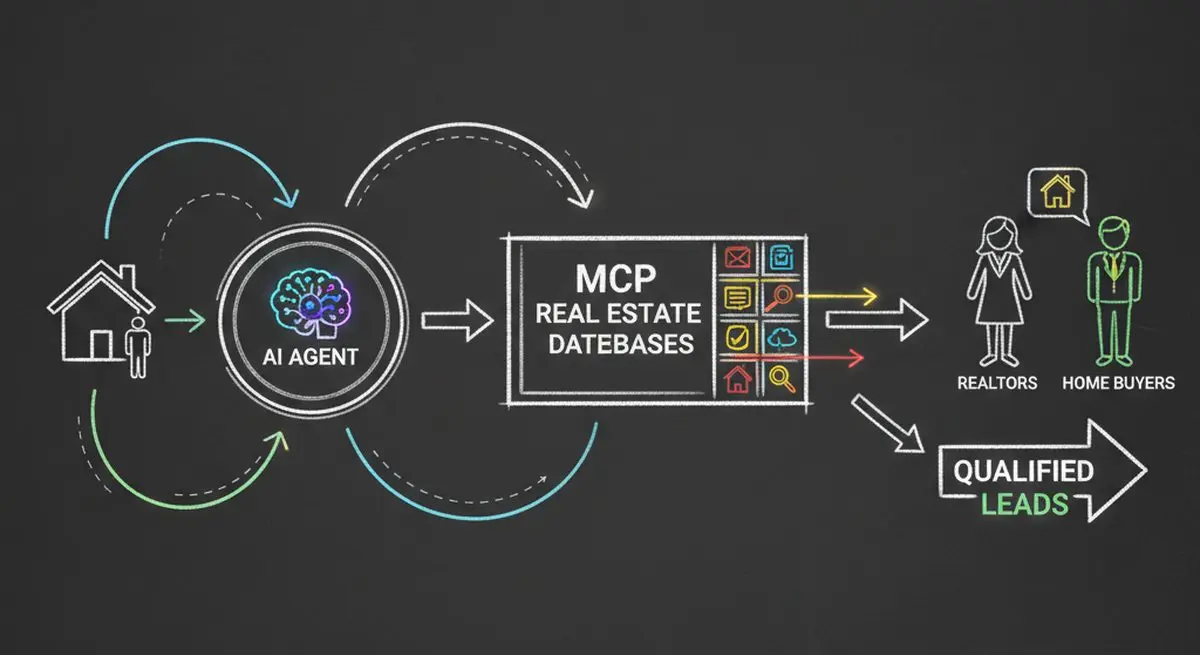
How AI Agent Funnels Work for Real Estate
Here is a proposed flow to configure and test:
Step 1: Buyer Initiates with AI
The buyer asks their AI assistant: "Find me a realtor in Denver who specializes in first-time buyers in my price range." The AI agent begins searching for realtors whose business profiles match the request.
Step 2: AI Agent Discovers Your Business
Review the form's Business Profile and Services, then opt into marketplace participation if appropriate. A connected agent can read available published information; discovery and current appointment availability are not guaranteed.
Step 3: AI Qualifies the Buyer
The AI agent asks the buyer qualifying questions on your behalf: budget range, pre-approval status, timeline, must-have features, neighborhoods of interest, and deal-breakers. The agent should ask for missing information rather than infer it. Your team still needs to verify relevant facts and confirm fit.
Step 4: You Receive a Scored Lead
The completed form appears as a reply. If Lead Scoring is enabled, it evaluates that reply against your high, medium, and low priority criteria and gives it a Verdict. Read the answers and verify any financing or scheduling details before acting.

Configuration Choices to Review
These are proposed operating practices, not findings from customer interviews:
1. Structured Service Profiles
Create a detailed, machine-readable profile listing their specializations (first-time buyers, luxury, investment properties), service areas (specific zip codes), price ranges, and languages spoken. The more structured data you provide, the better AI agents can match you with the right buyers.
2. Instant Response Windows
Assign an owner for new inquiries and state a response expectation your team can meet. Track unanswered replies and actual follow-up times.
3. Custom Qualification Criteria
Write criteria that reflect the services you offer and the information needed for review. Use the medium priority criteria for incomplete or uncertain details. Keep financing verification and professional judgment outside the AI verdict.
4. Marketplace Optimization
Keep your Business Profile, service descriptions, and contact details accurate. Do not infer ranking or recommendation guarantees from profile completeness.
Set Up and Test the Real Estate Intake
Step 1: Audit Your AI Visibility
Start with a free AX Audit on your website. This tells you whether AI agents can currently find and interact with your business.
Step 2: Create Your Agent-Ready Funnel
Set up a Dashform funnel with Agent Funnel enabled. Import your business profile -- it auto-detects your specializations, service areas, and contact info from your website.
Step 3: Configure Buyer Qualification Questions
Customize the qualification criteria AI agents use when screening buyers for you:
| Qualification Field | Example Values | Why It Matters |
|---|---|---|
| Budget Range | The price bands of your listings | Ensures buyer matches your listing inventory |
| Pre-Approval Status | Pre-approved / In progress / Not started | Signals buyer readiness |
| Timeline | 0-3 months / 3-6 months / 6+ months | Prioritizes urgency |
| Property Type | Single family / Condo / Townhome / Multi-family | Matches your specialization |
| Must-Haves | 3+ bed / Good schools / Garage / Yard | Enables precise matching |
| Deal-Breakers | No HOA / No flood zone / Max 30 min commute | Eliminates mismatches early |
Step 4: Configure Lead Scoring
Write high, medium, and low priority criteria, enable scoring, and inspect representative completed replies. Review and override mistaken verdicts rather than treating them as an admission rule.
Step 5: Connect Your CRM
Follow Up Boss, kvCORE, and LionDesk are external systems, not native Dashform connectors. Confirm supported API or Zapier actions, configure the field mapping, and test delivery. Do not assume every reply includes a transcript or that every field can be transferred.
Where the Return Comes From
Measure review time, appointments, and completed engagements in your own pilot. An agent-assisted inquiry is another intake path, not proof of a return on investment.
Addressing Common Realtor Concerns
"Real estate is personal -- AI can't replace the relationship"
Use the submitted answers as context for a conversation. Your judgment, verification, and relationship with the buyer remain necessary.
"My sphere of influence already generates enough leads"
Referral leads are gold -- but they don't scale. AI agent leads are a new channel that captures demand from consumers who start their home search with an AI assistant. These are buyers your sphere doesn't reach.
"I tried Zillow leads and they were terrible"
Portal products and lead arrangements vary. Compare your actual channel records; an agent-filled form does not prove that the buyer has contacted no other agent.
"My brokerage won't support this"
Check your brokerage's website, data, and marketing requirements before publishing. Review who owns the form, connected accounts, and follow-up process.
Frequently Asked Questions
How much does it cost to set up an agent funnel?
Check Dashform pricing for current access and allowances, plus external CRM or scheduling costs. Setup time depends on review and testing.
What AI agents can find me through Agent Funnel?
A compatible MCP client can interact with the published form when connected to its endpoint. Marketplace listing requires Services and participation to be enabled. Neither an endpoint nor a listing guarantees discovery by every assistant.
Can I control what types of buyers reach me?
Configure written high, medium, and low priority criteria around the services and areas you support. Lead Scoring evaluates completed replies for review; it does not enforce a numeric admission threshold or verify financing.
How do agent funnel leads compare to Zillow or Realtor.com leads?
An agent-filled form can collect buyer-provided details, but it does not establish exclusivity or verified buyer quality. Compare actual appointments and outcomes from each channel using your own reporting.
Start Receiving Pre-Qualified Buyer Leads Today
Test the form with representative buyer inquiries and inspect the saved answers before opening the channel to real prospects. Our guide to the lead qualification quiz covers question design and routing in more depth, Dashform for real estate and lead qualification with Dashform show the setup for agents, and the property inquiry form template is a starting point.
Ready to upgrade your lead quality? Run a free AX Audit to check your current AI visibility, then set up your Dashform Agent Funnel and verify the human and agent-assisted paths.