
TryInteract is one of the most well-known quiz builders for creators, coaches, and growing companies. Their features page highlights everything from AI quiz generation to email integrations, logic branching, templates, analytics, and personalized results.
Check Interact's current AI authoring options and plan requirements for the quiz you need.
Dashform AI Quiz Generator takes the same philosophy behind TryInteract… and rebuilds it for the AI era.
Dashform can draft a quiz from a prompt. Review the questions, branches, Endings, and branding before publishing; this guide does not establish a comparative speed or conversion advantage.
Dashform vs TryInteract: Quiz Maker Comparison
| Feature | Dashform | TryInteract |
|---|---|---|
| AI Quiz Creation | AI-assisted drafting and editing | AI quiz generation; check current plan access |
| Lead Qualification | Configured hot, warm, and cold verdicts on completed replies | Evaluate the quiz's scoring and email handoff |
| Starting Price | Free tier | Paid plans (pricing) |
| Branching Logic | AI-driven logic | Manual branching |
| Analytics | AI insights + reporting | Basic quiz analytics |
| Custom Branding | Theme and branding controls; check plan access | Check current plan access |
| CLI / Agent API | Yes, AI agent ready | Not available |
If you're evaluating quiz funnel and form builder platforms, you may also want to read our guide on AI quiz generators vs traditional quiz makers and learn how to create a high-converting quiz lead magnet.
Quick Summary
Evaluate Dashform for these capabilities:
- Draft questions with AI and edit them before publishing.
- Configure Logic Funnel branches or an AI Funnel brief with follow-ups.
- Author Endings and conditional Result Sections.
- Set written criteria for hot, warm, and cold lead verdicts.
- Check current plan allowances against your expected use.
Test the complete respondent path and saved reply before choosing a platform. For a sourced feature table and migration notes, see the Dashform vs Interact comparison page.
Dashform as a True TryInteract Alternative
Compare AI Drafts Using the Same Brief
Both products offer AI quiz authoring. Use the same audience, questions, outcome requirements, and contact fields in each. Inspect the generated draft for accuracy and missing details.
In Dashform, review:
- question wording and answer options
- required and optional fields
- branches and Endings
- result copy and recommendations
- theme and branding
- separate lead scoring criteria
No draft should be treated as publication-ready without that review.
TryInteract uses templates, Dashform writes one for you
TryInteract’s library includes:
- personality quiz templates
- product recommendation templates
- knowledge test templates
- coaching assessment templates
Dashform offers both Form Templates and AI drafting.
Why choose from templates when AI can generate a custom quiz designed specifically for your business?
Just type:
“Build a quiz that recommends the best skincare product based on lifestyle.” No template browsing. No editing for hours.
Test Branching and Follow-up Behavior
TryInteract allows conditional logic (IF → THEN rules). It works, but you must:
- click through every question
- manually create every condition
- test and fix breaks
Dashform Logic Funnels follow authored branches. AI Funnels can ask follow-ups using the maker's brief and settings. Test representative answers, including unclear answers, and check whether the result fits your intended workflow.
Review Theme and Branding Controls
TryInteract lets you:
- change colors
- adjust fonts
- pick themes
But it’s all manual.
In Dashform, configure the theme, logo, colors, typography, and copy, then preview the result on desktop and mobile. Import from Website fills the Business Profile; it should not be represented as automatic extraction of the site's complete visual design.
Personalized Results TryInteract Requires Manual Writing
TryInteract’s results are:
- customizable
- visually clean
- connected to email funnels
But you still have to:
- write descriptions
- write recommendations
- design the layout
- optimize for mobile
- add images
- test readability
In Dashform, author an Ending and use Result Sections for answer-dependent copy. Review any AI-drafted recommendations and test the conditions. Lead Scoring produces an internal hot, warm, or cold verdict, not a validated numeric assessment result.
Analytics: TryInteract Has Dashboards, Dashform Has Insights
TryInteract includes:
- results breakdown
- question-level drop-off
- conversion flow charts
Dashform includes:
- completion rate analysis
- reply completion states and insights
- an Analytics Agent for questions about collected replies
- charts or tables to inspect alongside the underlying answers
Instead of just showing data, Dashform explains it using natural language.
Compare Current Plan Requirements
This is the biggest difference.
TryInteract Pricing:
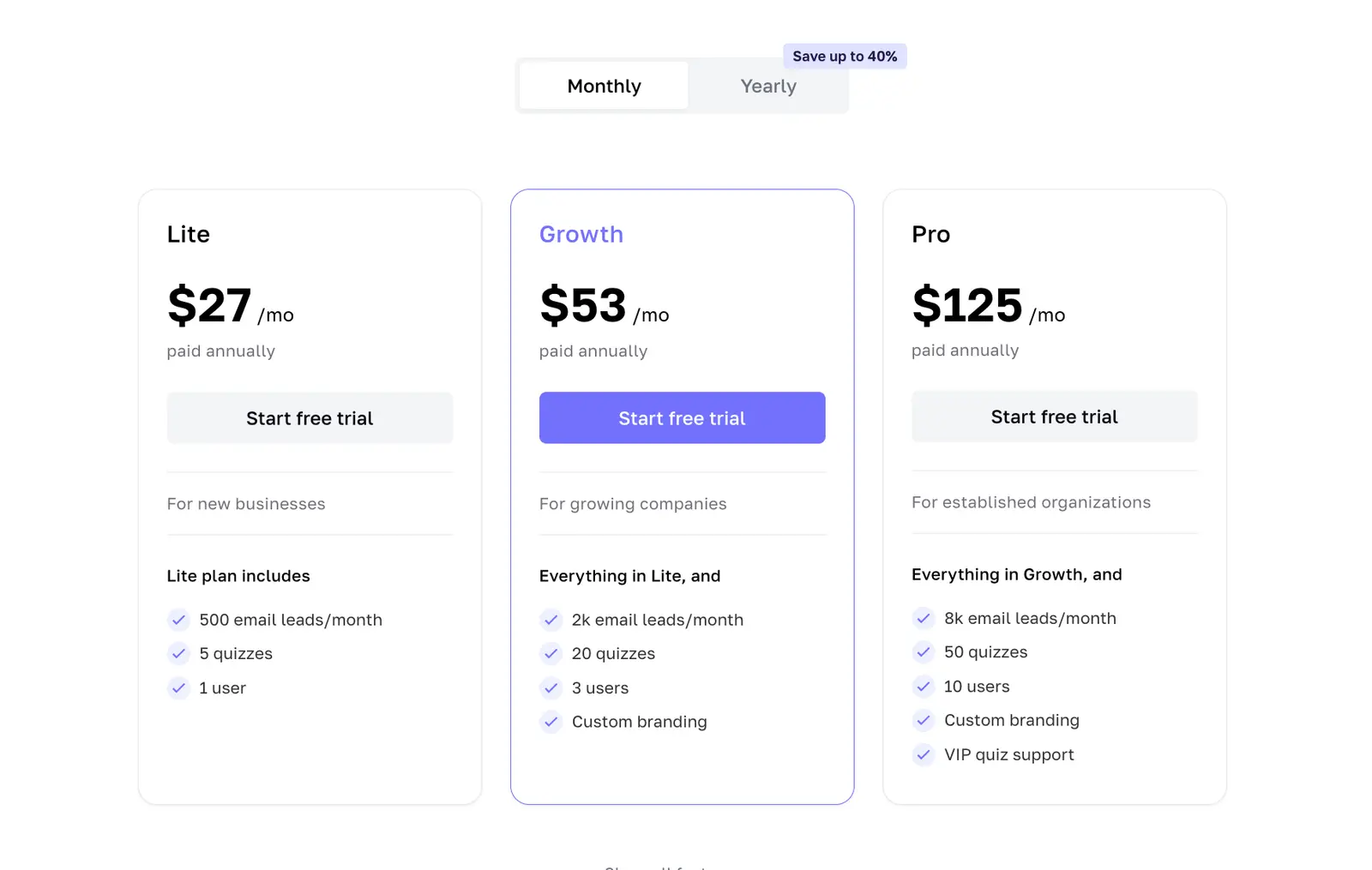
- Paid tiers from Lite to Pro; current prices are on Interact's pricing page
- Check quiz, contact, branding, and AI feature allowances for your planned workflow
Dashform Pricing
Check Dashform pricing for current form, reply, branding, and other feature allowances. Include external scheduling or email tools in your cost comparison.
Related Reading
Best Typeform Alternative for Lead Generation in 2026
Dashform vs Riddle: The Best Alternative for AI Quizzes
How to Create a High-Converting AI Quiz Lead Magnet