


Forms Aren’t Just Boxes and Buttons
Most people think forms are simple: boxes to type in, buttons to click, maybe a dropdown or two. But forms are actually where businesses collect their most valuable information:
- leads
- applications
- customer insights
- product feedback
- bookings
- payments
- onboarding details
Almost every important business workflow starts with a form — yet building them traditionally takes far too much time. You need to:
- think of the right questions
- write conditional logic
- design the layout
- match the brand
- and hope the final result doesn’t look like it was built in 2008
This is the problem Dashform AI Form was created to solve — not by making a “smarter” form builder, but by redefining who needs forms and why humans shouldn’t be doing the manual work anymore.
Form Builder Evolution: Traditional vs AI-Native
| Generation | Era | Creation Method | Intelligence | Example |
|---|---|---|---|---|
| Gen 1: Static Forms | 2000s | HTML coding | None | HTML forms |
| Gen 2: Drag-and-Drop | 2010s | Visual builder | Basic logic | Typeform, JotForm |
| Gen 3: No-Code | 2018+ | Template-based | Conditional logic | Tally, FormHug |
| Gen 4: AI-Native | 2024+ | Prompt-based | Full AI scoring + branching | Dashform |
Who Dashform AI Form Is Built For
Dashform AI was designed for the teams who are constantly switching between tabs, campaigns, clients, and deadlines.

• Small businesses: They need professional forms but don’t have developers or designers on standby.
• Startups: Ideas move fast; manual form building slows everything down.
• Marketing teams: Launching campaigns weekly — no time to redesign a sign-up flow every single time.
• Product teams: They want meaningful insights, not stiff multiple-choice answers.
• HR teams: Drowning in job applications and repetitive screening questions.
• Educators & course creators: Collecting assessments without losing hours formatting.
• Agencies: Onboarding clients who rarely send complete information unless guided carefully.
• Individual creators: Planning events, launching side projects, collecting community feedback.
Despite their differences, they all share the same pain: Traditional forms are slow to create, too static, and too manual for modern workflows.
Dashform AI Form Solutions
Smart Follow-Up Questions
You want your forms to feel alive, not robotic. Dashform gives you that edge. When someone fills out your AI Form, the system listens and responds just like a real person. It automatically generates follow-up questions based on each answer. This means your form understands what users say and adapts in real time.
- Dashform transforms static fields into a dynamic two-way conversation.
- The AI Form mimics human interaction by asking intelligent follow-up questions.
- You collect more meaningful and structured data because the form always stays relevant.
Imagine a customer says, “The checkout process was confusing.” Instead of stopping there, your form asks, “Which part felt confusing?” or “What did you expect to happen instead?” You get deeper insights and your users feel heard. This approach keeps people engaged and helps you gather the information you actually need.
When your form acts like a conversation, you boost completion rates and discover insights that static forms miss.
Brand-Aware Customization
Your brand deserves to shine in every interaction. Dashform lets you customize every detail so your AI Form matches your company’s style and voice. You control the tone, the way the AI interacts, and the look of your forms. This level of customization helps you build trust and stay consistent across all touchpoints.
Here’s how Dashform adapts to your brand:
| Customization Aspect | Description |
|---|---|
| AI Tone | You can tailor the tone of the AI to match your brand’s communication style. |
| Interaction with Respondents | You decide how the AI interacts with users to reflect your brand values. |
| Form Design | You modify the design, layout, and logic to fit your branding needs. |
You never have to settle for generic forms again. Dashform ensures every form you share looks professional and feels like a natural extension of your business.
Real-World Impact
Dashform changes the way you work. You see the difference in real scenarios:
- Sarah, the Solo Founder: Sarah runs a skincare brand. She needs a feedback form for a new product launch, but she’s short on time. With Dashform, she types a simple prompt. The AI Form builds itself, complete with smart questions and branded design. Sarah shares the form in her campaign and gets valuable feedback overnight.
- Daniel, the Marketing Manager: Daniel juggles multiple campaigns. He needs several forms—fast. Dashform lets him create each AI Form instantly. The system handles follow-up logic and integrates with his favorite tools. Daniel’s team collects better data and launches campaigns on schedule.
- Maya, the Product Designer: Maya wants honest feedback from users. Her old surveys felt cold and generic. With Dashform, users share real thoughts. The AI Form asks follow-up questions that dig deeper. Maya finally gets the insights she needs to improve her product.
You can see how Dashform adapts to your needs, saves you time, and delivers results. Whether you run a business, manage a team, or design products, Dashform gives you the power to collect information smarter and faster.
Don’t let outdated forms slow you down. Choose Dashform and experience the future of data collection.
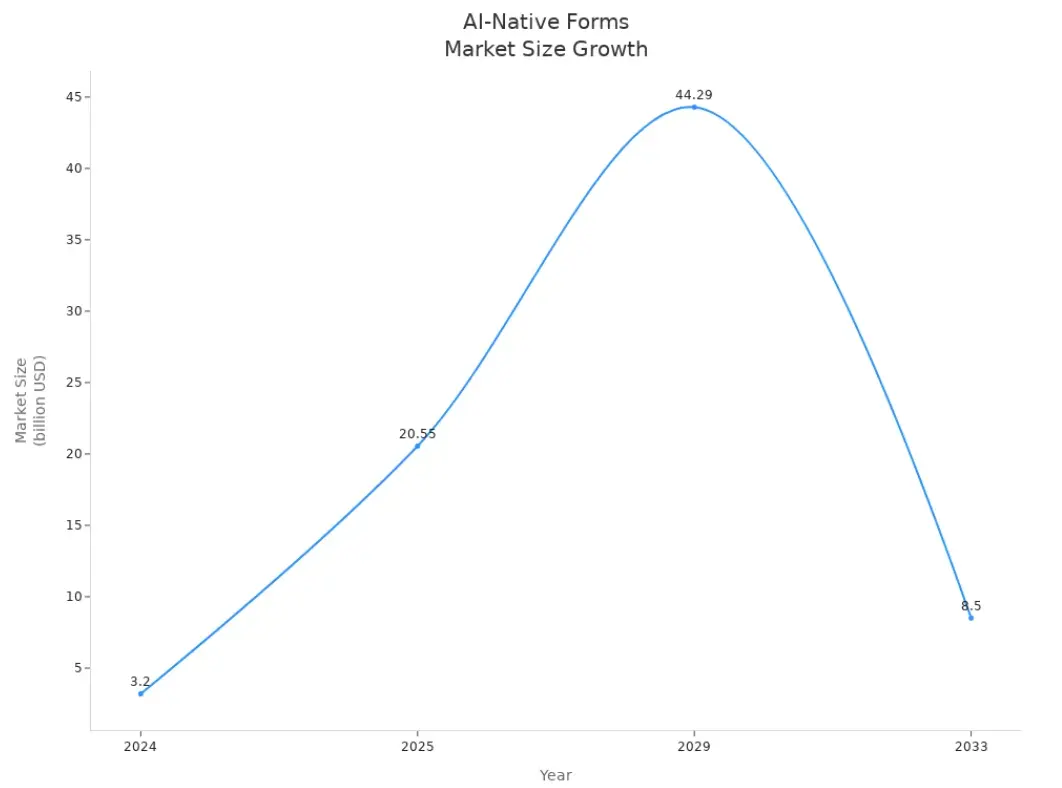
You deserve forms that work for you. Dashform AI Form solves slow creation, static design, and poor data quality. You build smarter forms in seconds. Your business gains deeper insights and higher engagement. Industry trends show rapid growth in AI-native forms.
A New Standard for Modern Form Building
Tools Should Be Fast, Beautiful, and Intelligent
The audience for AI forms is bigger than ever, but united by one expectation: software should make decisions for you, not the other way around.
Dashform AI delivers through:
• Instant generation: Your form exists the moment your idea does.
• Brand-aware design: Colors, layout, and style adapt automatically.
• AI / Normal mode toggle: Full AI interactivity or classic form behavior — your choice.
• Effortless integrations: Connect your tools without complexity.
• A frictionless workflow: Feels intuitive from the first second.
At its heart, Dashform AI Form is for anyone who needs to collect information without wasting time creating the thing that collects it.
Scenarios: How Different People Use Dashform AI

Sarah: The Solo Founder
“I need a feedback form before tomorrow… but it’s already midnight.”
Sarah runs a small skincare brand from her apartment. Her day is a blur of orders, emails, TikToks, and packaging. Late at night, she suddenly remembers:
“I need a product feedback form for next week’s launch.”
The old way would take at least an hour. With Dashform, she types:
“a feedback form for customers who tried our new serum”
Dashform builds:
- the questions
- the layout
- the logic
- the branding
in seconds. She pastes the link in her campaign and goes to sleep.
Learn more about Dashform solutions for Small Business
Daniel: The Marketing Manager
“Four campaigns. Four forms. Zero time.”
Daniel’s team needs a webinar signup form, a quiz for ads, a lead capture form, and a customer satisfaction survey — all today.
Normally this is half a day of copywriting, designing, logic building, and analytics setup.
With Dashform AI:
- he prompts
- AI generates
- forms are ready
And the follow-up logic gives him smarter data than traditional surveys ever could.
His boss thinks he worked all afternoon. He didn’t. Dashform did.
Learn more about Dashform solutions for marketers
The Future of Forms
Forms are the beginning of every important interaction — signups, onboarding, research, purchases, applications.
Dashform AI ensures that beginning feels:
- intelligent
- effortless
- modern
- and deeply human-centered
Instead of designing forms, you focus on the insights they bring.





